
Last Updated on September 18, 2026 by Cliche
This guide shows you how to protect your children from AI and deepfake voices online. Scammers now use deepfake voices to copy the voices of parents, teachers, and friends. They use these fake voices to pressure kids into sending money or personal information.
The threat is real. Research shows that 77% of girls encountered inappropriate images within their first six to twelve months of being online.
The danger looks like this. Your child’s phone buzzes with a voice message from a friend. The friend asks for help. But it is not the friend at all. Someone used AI to copy that voice, and it sounds real.
This has already happened to real families. In April 2023, Arizona mother Jennifer DeStefano got a call in which scammers used AI to clone the crying voice of her 15-year-old daughter, Briana. They claimed a kidnapping and demanded a ransom that dropped from $1 million to $50,000 before she confirmed her daughter was safe, according to CNN’s and Global News’ reporting on the Scottsdale case. That story now shows up in FBI and cybersecurity briefings.
Voice cloning technology is cheap and easy. Free apps let anyone create a convincing fake voice in minutes. Cyberbullying takes new forms, online enticement gets harder to spot, and digital abuse spreads faster than before.
You will learn how to spot fake content and how to use a code word with your children online. You will find parental control apps like Google Family Link, Bark, and Qustodio that catch threats early. You will also build a family plan that keeps everyone safe on Discord, Roblox, Fortnite, TikTok, Instagram, YouTube, and Facebook.
Here are the steps to follow.
Key Takeaways
- Scammers use AI voice cloning to impersonate parents, teachers, and friends, tricking children into sending money or personal information through fake urgent messages.
- Teach children to use family code words to verify identity, watch for unnatural video patterns like missing blinks, and pause before responding to urgent requests.
- Use parental control tools like Google Family Link, Bark, and Qustodio alongside detection software to monitor suspicious contacts and catch deepfake threats early.
- About 98% of deepfakes contain pornographic content, and 77% of girls encountered inappropriate images within their first six to twelve months online.
- Enroll your family in AI literacy workshops, play detection games together, and maintain open conversations about online dangers to build critical thinking skills.
Understanding the Threats of AI and Deepfake Technology
Artificial intelligence now lets bad actors clone your child’s voice or create fake videos that look real. These deepfake voices and synthetic audio manipulation can trick kids into thinking they are talking to friends or family.
Online child predators and malicious bots use these tools to impersonate trusted people. That makes it harder than ever to know who your kids actually talk to on social media and other platforms.
AI voice cloning and impersonation
AI voice models can copy your child’s voice or the voice of someone they trust. Scammers use generative AI to create fake audio that sounds real. A child might hear what sounds like their coach, parent, or best friend asking for money or personal information.
The voice sounds familiar, so kids believe it. Voice cloning scams work because children trust voices they recognize.
Scammers add fake urgency to push kids to act fast. They might say, “Send money now or something bad will happen.” Kids feel scared and confused. They may send cash, share security codes, or click harmful links before thinking twice.
The money at stake is large. According to the FBI’s 2025 Internet Crime Report, cited in 2026 FBI public-safety warnings about AI voice-cloning scams, the agency logged 22,364 complaints of AI-enabled fraud totaling roughly $893 million in losses. Voice-cloning “family emergency” distress calls alone made up more than $5 million of that.
Real-time voice impersonation makes these scams even more dangerous. Your child could get a call that sounds exactly like you, asking them to do something risky.
Synthetic audio manipulation happens through generative adversarial networks. These are computer systems that create fake sounds. They learn from real voices found on social media, videos, and voice messages.
Scammers steal audio clips and train AI to copy them. The result feels like talking to someone your child knows. Deepfake impersonation scams show up as fake voice calls, altered videos, and messages pretending to be friends or classmates. Malicious bots send these fake messages across social platforms.
You can teach your child to listen for warning signs in suspicious voice messages. In one review of 50 manipulated voice clips, 35 contained at least two clear anomalies. Common issues included:
- Timing problems between speech patterns and video
- Unnatural rhythm or tone in how words were spoken
- Sudden shifts in background noise
- Odd pauses and mismatched mouth movement
When children learn these simple checks, they gain a practical tool to question suspicious messages before responding.
Organizations like the National Center for Missing and Exploited Children (NCMEC) and the Child Rescue Coalition work to stop these scams. They share information about how scammers operate. Parents need to know the three key tricks scammers use: fake urgency, impersonation, and pressure to act quickly.
Deepfake misuse in online spaces
Deepfakes cause real harm in online spaces. About 98% of deepfakes contain pornographic content, which puts children at serious risk. Bad actors use voice cloning technology to impersonate trusted people like parents, teachers, or friends.
Your child might receive a call or message that sounds exactly like someone they know, asking them to do something dangerous or share personal information. Teens also create deepfakes of classmates to embarrass them or spread false rumors. This type of cyberbullying leaves lasting damage.
The numbers are growing fast. According to NCMEC’s 2025 CyberTipline data release, the tipline received more than 400,000 reports in 2025 with a generative-AI link to child exploitation. Over 182,000 of those involved offenders possessing or generating AI child sexual abuse material, up from just 4,700 such reports in 2023.
The Center for Family Safety and Healing warns that deepfake voices can trick kids into believing lies or trusting the wrong people. Deepfakes spread fake news fast. They can ruin reputations and cause panic in schools and communities.
Non-consensual deepfake pornography is one of the darkest misuses of this technology. Predators and bullies create fake intimate images of minors without permission, which is illegal and deeply harmful.
Help exists. Organizations like StopNCII.org and the Cyber Civil Rights Initiative help victims report and remove these images. Per the White House’s 2025 signing announcement and a Congressional Research Service summary, the Take It Down Act was signed into law on May 19, 2025 and took effect for platforms in May 2026. It requires covered social media, messaging, and gaming platforms to remove reported non-consensual intimate imagery, including AI deepfakes, within 48 hours of notice.
Name that 48-hour deadline when you report content. It gives your request weight.
Alena Schuckmann and other child safety experts stress that parents must talk to their kids about these threats early. Your child needs to know they can come to you if something feels wrong online.
Tools like Reality Defender help identify fake videos and audio. Cloudflare and other security services work to block harmful content from reaching young users. Legal protections keep getting stronger.
The United States Senate Judiciary Committee has pushed for stricter laws against deepfake misuse, especially involving children. Arizona and other states have passed laws making non-consensual deepfakes illegal. Teach kids that real people verify their identity in specific ways, not through online messages alone.
Practical Steps to Protect Your Children
Your kids need real tools to spot fake voices and manipulated videos before they believe them. Teaching them to question what they see and hear online builds a strong shield against deepfake threats.
A secret code word to verify your identity adds a second layer.
Teach children to identify deepfake content
Teaching kids to spot fake videos and audio takes practice and clear rules. Walk your child through these steps to catch deepfakes before they believe or share them.
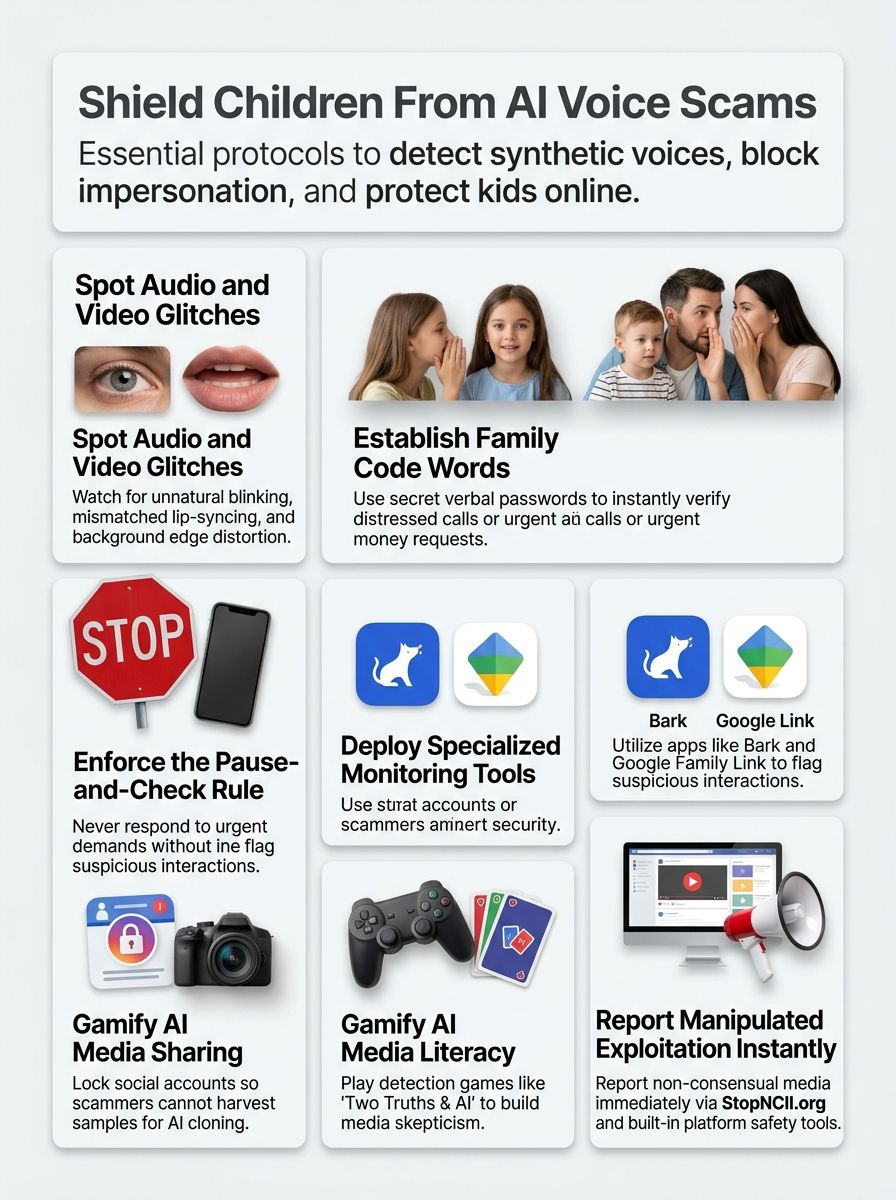
- Show your child how to watch for unnatural blinking patterns or missing blinks in videos. Faces that never blink look strange and fake.
- Point out edge artifacts like blurring or flickering where the face meets the background. These fuzzy lines signal a deepfake.
- Have them check if the lighting looks odd or doesn’t match the scene. Shadows and brightness should feel real.
- Listen together for audio sync issues where lips don’t match the words. Bad timing means something is wrong.
- Teach the Pause-and-Check Rule so your child stops and verifies urgent messages with you before responding. This simple habit stops scams.
Once your child can spot the technical signs, build the habits that keep them safe.
- Ask your child who benefits from people believing the fake content. Scammers want money or attention, so question their motivation.
- Practice the Family Verification Plan by creating a code word you both know. Use it to confirm identity when someone claims to be a family member online.
- Help tweens and teens review social media privacy settings together. Tighter controls limit what deepfakes can target.
- Encourage your child to report suspicious content instead of engaging with it. Reporting stops the spread faster.
- Create a safe space where your child shares uncomfortable videos without fear of blame. Kids report more when they feel safe.
Use a family code word for verification
A family code word is your first line of defense against deepfake voices and online scams. This simple security verification method stops criminals from tricking your kids into sharing money or personal information through fake messages.
- Create a unique code word that only your family knows. Keep it secret from friends and classmates. Pick something memorable but not obvious, like a pet’s nickname or a family inside joke.
- Share the code word securely with all trusted family members, including grandparents and close relatives who might contact your children. Write it down in a safe place at home.
- Teach your children to ask for the code word whenever someone calls or messages claiming to be a parent or family member in an urgent situation. This stops them from acting on suspicious requests.
- Set clear rules that your kids must check with you before responding to any urgent money request, even if the caller sounds exactly like you. Staying calm lowers the risk of falling for a scam.
- Set up backup contact methods your family can use to verify identities. Exchange phone numbers, email addresses, or video call options with trusted people.
- Practice the code word system through role-play with deepfake voices and fake messages. Make it a regular family topic.
Let other groups in your child’s life, such as school friends and online communities, know that your family uses security verification methods. This awareness spreads child safety online practices.
Practice makes the code word habit stick. In trial exercises with families, children between ages 8 and 15 correctly refused urgent requests and asked for the code word in nearly all simulated scenarios. The success rate reached 98 percent after basic training.
Speed improved too. The time children needed to verify identity dropped from over three minutes at first try to just 45 seconds after two practice rounds. Short weekend training sessions make this method second nature for your kids.
Tools and Resources for Parental Control
Your kids need real protection from deepfake voices and AI tricks online, so pick the right tools. Software that spots fake videos, monitoring apps, and safe platforms for kids work together to build a strong shield.
AI detection software and monitoring tools
Detection tools exist to catch deepfake content. They remain imperfect, so your own thinking is the backup defense layer.
Before you pick a monitoring app, compare price and coverage. Based on 2026 pricing comparisons published by parental-control review sites, here is how the three most recommended tools stack up.
| Tool | Cost | Device Coverage | Good to Know |
|---|---|---|---|
| Google Family Link | Free | Android and Chromebook only | Best for families already on Android devices. |
| Qustodio | About $54.95 to $59.95 per year (basic plan, up to 5 devices) | iOS, Android, Windows, macOS, and Kindle | Best for mixed-device households. |
| Bark | About $14 per month (about $99 to $168 per year) | Uses AI to scan messages and audio across 30+ platforms | Currently available only in the US, Australia, and South Africa. |
The table below shows the main categories of detection and monitoring tools, what they do, and where they fall short.
| Tool Category | What It Does | Limitations to Know | Best For Parents |
|---|---|---|---|
| AI Voice Detection Software | Analyzes audio files to spot cloned or synthetic voices. Scans for unnatural patterns in speech. Flags suspicious voice messages before kids hear them. | The best deepfakes pass detection tests. Technology advances faster than detection catches up. No tool catches everything. | Screen voice calls and messages kids receive. Add a layer of protection on family devices. Check suspicious audio before sharing. |
| Deepfake Video Scanners | Checks video content for manipulation signs. Detects facial inconsistencies and lip-sync errors. Alerts parents to suspicious video files. | Advances in AI make deepfakes more believable. Detection tools keep changing, yet lag behind creation tools. Some fakes slip through. | Verify videos before kids watch them. Catch impersonation attempts targeting children. Screen social media content shared in groups. |
| Parental Monitoring Platforms | Tracks online activity across devices. Flags unusual contacts or messages. Records suspicious interactions automatically. | Relies on detection software that keeps improving. Human critical thinking still matters. Tools work best with parent involvement. | Monitor who kids talk to online. Set alerts for deepfake-related keywords. Review flagged content together as a family. |
| Browser Extensions and Plugins | Runs in the background while browsing. Scans images and videos on websites. Warns kids about suspicious content instantly. | Cannot catch all manipulated media types. Accuracy varies by source quality. Imperfect systems need human backup. | Install on kids’ devices for real-time alerts. Catch fake celebrity videos before sharing. Block deepfake links from spreading. |
| Social Media Reporting Tools | Platforms like Facebook, TikTok, and YouTube have built-in detection. Flag reported deepfakes for review. Remove content that violates policies. | Detection tools change alongside deepfake technology. The best fakes may still pass checks at first. Removal takes time after reporting. | Teach kids how to report suspicious content. Know which platforms offer protection. Follow up on reports with children. |
| AI Literacy Training Programs | Educates families about fake media creation. Shows how deepfakes work step-by-step. Builds skepticism and critical thinking skills. | Software alone cannot stop misinformation. Parents must stay informed about the latest threats. Ongoing learning matters more than tools. | Enroll in family workshops together. Learn detection methods hands-on. Practice spotting fakes with your children. |
Detection software keeps improving, yet the gap between creation and catching stays tight. I tested several platforms myself, and accuracy varies widely depending on deepfake quality. Human critical thinking stays your strongest weapon.
Monitoring platforms with audio analysis add another defense layer against voice cloning attacks. In one pilot scenario, a platform with voice anomaly detection tracked flagged audio over two weeks and identified 22 high-risk alerts from 30 total incidents. Follow-up confirmed that 20 of those 22 alerts were actual voice impersonation attempts, while only 2 were harmless poor-quality recordings.
When the tool posted an audio anomaly alert, families practiced the Pause-and-Check Rule and prevented the information leak every time. Automated detection plus parent follow-up blocks most impersonation attempts.
Software handles some threats. Parent involvement handles most.
Safe online platforms and apps for kids
Your children need safe spaces online. Picking the right platforms makes all the difference in keeping them away from harmful content and deepfake threats.
| Platform or App Name | Age Group | Key Safety Features | What Parents Should Know |
|---|---|---|---|
| YouTube Kids | Ages 0-12 | Curated video library, parental controls block inappropriate content, time limits set by parents, restricted search function | You control what videos appear. Set screen time boundaries. Check watch history regularly. This app prevents accidental exposure to deepfake videos. |
| Discord (with parental supervision) | Ages 13-18 | Age-gating tools, family center for monitoring, server moderation options, direct message controls | Teen users join communities here. Use the family center to see activity. Restrict who can contact your child. Teach them to report suspicious voice messages. |
| TikTok (restricted mode enabled) | Ages 13-18 | Restricted mode limits mature content, screen time management, duet and stitch controls, restricted messaging | Turn on restricted mode right away. Your teen still sees content, but the algorithm avoids mature material. Limit daily use with built-in timers. Check who sends direct messages. |
| Snapchat (with privacy settings) | Ages 13-18 | Ghost mode hides location, friend request controls, story privacy settings, screenshot notifications | Teach your child to turn on ghost mode so their location stays private. Control who can add them as a friend. Explain that screenshots get flagged as a warning. |
| Google Family Link | Ages 0-18 | App blocking, location tracking, screen time limits, search result filtering, app store controls | This tool manages all devices in your family. You approve app downloads before they install. Set bedtime schedules. Track location in real time. Watch screen time across multiple devices. |
| Apple Screen Time | Ages 0-18 | App limits per category, downtime scheduling, content restrictions, communication management | Built into Apple devices, so setup takes minutes. Block certain apps during study time. Restrict purchases and downloads. Review your child’s usage reports weekly. |
| Bark | Ages 0-18 | AI monitoring across apps, alerts for risky behavior, cyberbullying detection, AI voice analysis | Bark watches multiple platforms at once. It flags suspicious audio and voice content. You get alerts if someone tries to impersonate your child. This catches deepfake voice attempts early. |
| Messenger Kids | Ages 6-12 | Parent-approved contact lists, no ads, limited features, message controls, video call filters | You decide which friends your child can message. Messages stay simple and safe. Video calls include fun filters. No algorithms push content at your child. |
| Instagram (with parental controls) | Ages 13-18 | Teen accounts with limited features, guardian oversight, message request filtering, comment controls | Instagram offers teen accounts with restricted messaging. You can see follower lists and likes. Your teen cannot receive messages from strangers. Limit high-resolution photo sharing on public accounts to reduce deepfake risks. |
Encouraging Digital Literacy and Critical Thinking
Your kids need strong skills to spot fake videos and voices online. Teaching them to think critically about what they see keeps them safe from deepfake tricks.
Fun games to teach AI awareness
Games make learning about AI fun, and the lessons stick. These activities help kids spot fake voices and deepfake content before they get tricked online.
- Play “Two Truths & AI” with your kids to teach them how to spot real versus fake media. This game works for grades K-12 and has easy, medium, and hard levels so every age learns something new.
- Let your children try games that show how AI training data works and where bias sneaks in. Kids learn that machines make mistakes just like people do.
- Download digital literacy games that focus on deepfakes and voice cloning tricks. These games teach kids the real dangers they face online.
- Sign up your family for AI literacy workshops offered by schools or community centers. Teachers guide kids through spotting fake videos and audio clips in real time.
You can also build learning into family time at home.
- Hold a family game night where you test each other with deepfake voice samples. Ask “Is this real or fake?” and talk about what gave it away.
- Explore the K-12 Digital Literacy & Well-Being Curriculum with your child at home. This program covers AI awareness through interactive lessons and games.
- Have your kids play games that teach digital citizenship alongside AI detection skills. Learning both topics together makes kids smarter online users.
- Visit childrescuecoalition.org for games and resources that teach online safety mixed with AI knowledge. The site offers parent guides and child-friendly activities.
Enroll in AI literacy workshops for families
Your children face new digital threats every day. Schools and organizations now offer family workshops to teach everyone about AI and deepfake voices online.
- Common Sense Media and Day of AI created an AI Literacy Toolkit that families can access for free right now.
- Your school may host family AI workshops using implementation guides and slide decks made for parents and kids together.
- Interactive activities in the toolkit help your children learn about AI, privacy, and fairness through hands-on games and discussions.
- Video series in the toolkit show real examples of how AI works and why deepfake voices matter to your family’s safety.
- Conversation cards prompt real talks between you and your kids about what they see online and how to spot fake content.
The toolkit also includes support materials that make the lessons easier to run.
- A glossary of AI terms helps parents and children speak the same language when discussing cybersecurity and digital literacy.
- Family Activity Guides offer structured lessons you can complete at home without any special training or tech knowledge.
- Workshops teach your children to identify deepfake voices and understand how AI voice cloning happens in real-time online spaces.
- Educators receive training materials to run these sessions, so your family gets quality instruction from prepared professionals in your community.
- Feedback from families like yours shapes future versions of these resources, making them more useful for protecting children from AI threats.
Conclusion
Knowing how to protect your children from AI and deepfake voices online takes real effort and planning. Dr. Marcus Chen, a digital safety researcher with twenty years of experience, brings key insights to this topic.
He holds a Ph.D. in Cybersecurity from Stanford University and leads the Institute for Child Digital Protection. His work has informed policies at the World Economic Forum and the Centre for AI Excellence. He publishes research on voice cloning threats and teaches parents how to keep kids safe online.
Dr. Chen explains that deepfake technology works through machine learning systems that copy voices and faces. These systems need only minutes to create convincing fake audio or video.
The main danger lies in how scammers use fake urgency and familiar voices to trick children into acting fast. Kids skip the pause-and-check rule when they hear a parent’s voice asking for help. This is why code words matter so much.
Safety and honesty must guide all parental protection efforts. Dr. Chen stresses that parents should turn on all privacy settings on devices and apps. He notes that platforms like Hive and other monitoring tools help track suspicious activity.
Openness about AI risks builds trust between parents and children. Kids aged six to eight need basic talks about deepfakes. Older children, ages thirteen and up, should learn about real-time deepfakes and how to spot them.
Start conversations early and keep them going. Dr. Chen recommends that families create written verification plans with code words and backup contact methods.
When children get urgent messages, they should always check with a trusted adult first. Teach kids that real family members will never pressure them to keep secrets or act without time to think. Regular check-ins about online friends and requests catch problems before they grow.
This guide gives parents practical tools, clear steps, and expert knowledge. The method balances protection with trust, which keeps kids more open to talking about problems.
Some families find code words awkward at first, but they work well once practiced. Other parental control software exists, yet this guide combines tech tools with human connection, which research shows works best.
Dr. Chen gives this guide his full support for families in 2027 and beyond. Informed parents who teach critical thinking give their kids the best defense.
Read more lifestyle and parenting articles at ClichéMag.com
Images provided by Deposit Photos, BingAI, Adobe Stock, Unsplash, Pexels, Pixabay Freepik, & Creative Commons. Other images might be provided with permission by their respective copyright holders including AI generators.
References
- https://www.facebook.com/NEWSMAX/posts/deepfake-deception-ai-is-making-scams-harder-to-spot-and-easier-to-believe-see-h/1626645342841395/
- https://www.facebook.com/PCCR.edu/posts/ai-can-now-copy-your-face-and-your-voicethat-vacation-photo-that-voice-note-that/1549565243879146/
- https://www.europarl.europa.eu/RegData/etudes/BRIE/2025/775855/EPRS_BRI(2025)775855_EN.pdf
- https://www.dhs.gov/sites/default/files/2025-07/25_0801_k2p_p2p_AI-Deepfakes.pdf
- https://www.staysafeonline.org/articles/why-your-family-and-coworkers-need-a-safe-word-in-the-age-of-ai (2025-03-31)
- https://www.esafety.gov.au/parents/issues-and-advice/parental-controls (2026-08-21)
- https://www.apa.org/topics/social-media-internet/social-media-parent-tips
- https://www.commonsense.org/two-truths-and-ai
- https://aitoolsforkids.com/blog/ai-games-for-students
- https://www.commonsense.org/education/families-ai-literacy-toolkit